Dashboard Guide
What everything on the dashboard does, section by section.
Filters
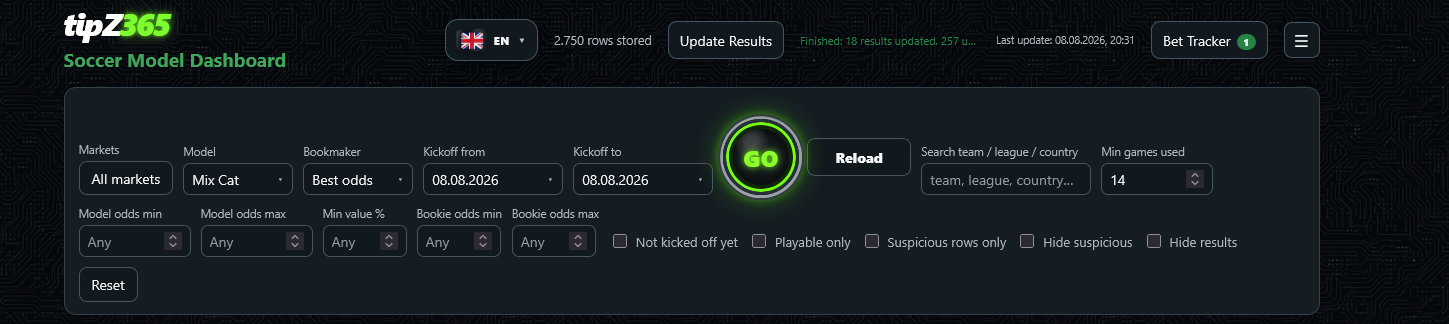
- Markets
- Which betting markets are shown (1X2, Over/Under 2.5, BTTS, Home/Away 2+). Default: all.
- Model
- Which prediction model is used as the comparison basis (Mix Cat, ML, ML Mix, Extrem, Fair Special, Fair Odds 5xG).
- Bookmaker
- Which bookmaker's odds are compared. "Best odds" automatically picks the highest available price, or lock it to one specific bookmaker.
- Kickoff from / to
- Date range of matches shown.
- GO
- Loads data for the selected date range fresh from the server.
- Reload
- Refreshes the current view without changing the date range.
- Search team / league / country
- Free-text search across team, league and country names.
- Min games used
- Minimum number of historical games the model needed for its estimate — filters out predictions built on too little data.
- Model odds min/max
- Only show rows whose model (fair) odds fall in this range.
- Min value %
- Only show rows with at least this much value advantage.
- Bookie odds min/max
- Only show rows whose bookmaker odds fall in this range.
- Not kicked off yet
- Hides matches that have already started.
- Playable only
- Only shows rows that clear the minimum value threshold (green checkmark).
- Suspicious rows only / Hide suspicious
- Show only, or hide, rows flagged as statistically unusual.
- Hide results
- Hides the final score badge on already-finished matches.
- Reset
- Restores all filters to their defaults.
Overview: Quick Analysis, stats and charts
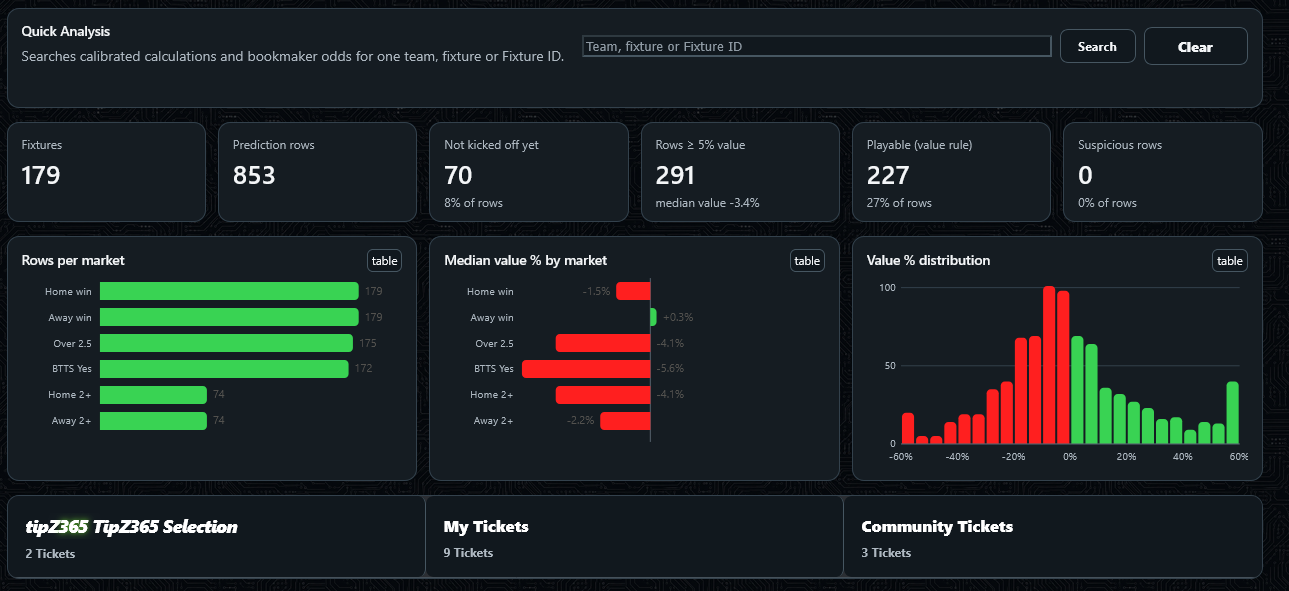
Quick Analysis
- Search box
- Looks up calibrated model calculations and bookmaker odds for one specific team, fixture, or Fixture ID — separate from the main filtered table above.
- Search
- Runs the lookup.
- Clear
- Clears the search box and result.
Stat tiles
These numbers always reflect your current filter settings, not the whole database.
- Fixtures
- Number of distinct matches in the current view.
- Prediction rows
- Total number of market rows — each match can contribute several (1X2, Over/Under, BTTS, etc.).
- Not kicked off yet
- How many rows are for matches that haven't started yet, and what share of the total that is.
- Rows ≥ 5% value
- How many rows clear at least +5% value, plus the median value across all rows.
- Playable (value rule)
- How many rows clear the minimum "worth betting on" threshold, and what share of the total that is.
- Suspicious rows
- How many rows are flagged as statistically unusual (see "Suspicious rows only" / "Hide suspicious" in the filters above).
Charts
- Rows per market
- How many prediction rows exist for each market in the current filter.
- Median value % by market
- The typical value edge per market — green means positive (favourable) on average, red means negative.
- Value % distribution
- A histogram of how value % is spread across all current rows — a quick visual read on how many good vs. poor opportunities there are right now.
- "table" button
- Switches a chart to a plain data table instead of the graphic — same numbers, easier to read exact values.
Tickets row
- TipZ365 Selection
- Curated official tip tickets put together by TipZ365 itself.
- My Tickets
- Your own saved betslip tickets.
- Community Tickets
- Tickets shared publicly by other members.
The Predictions table
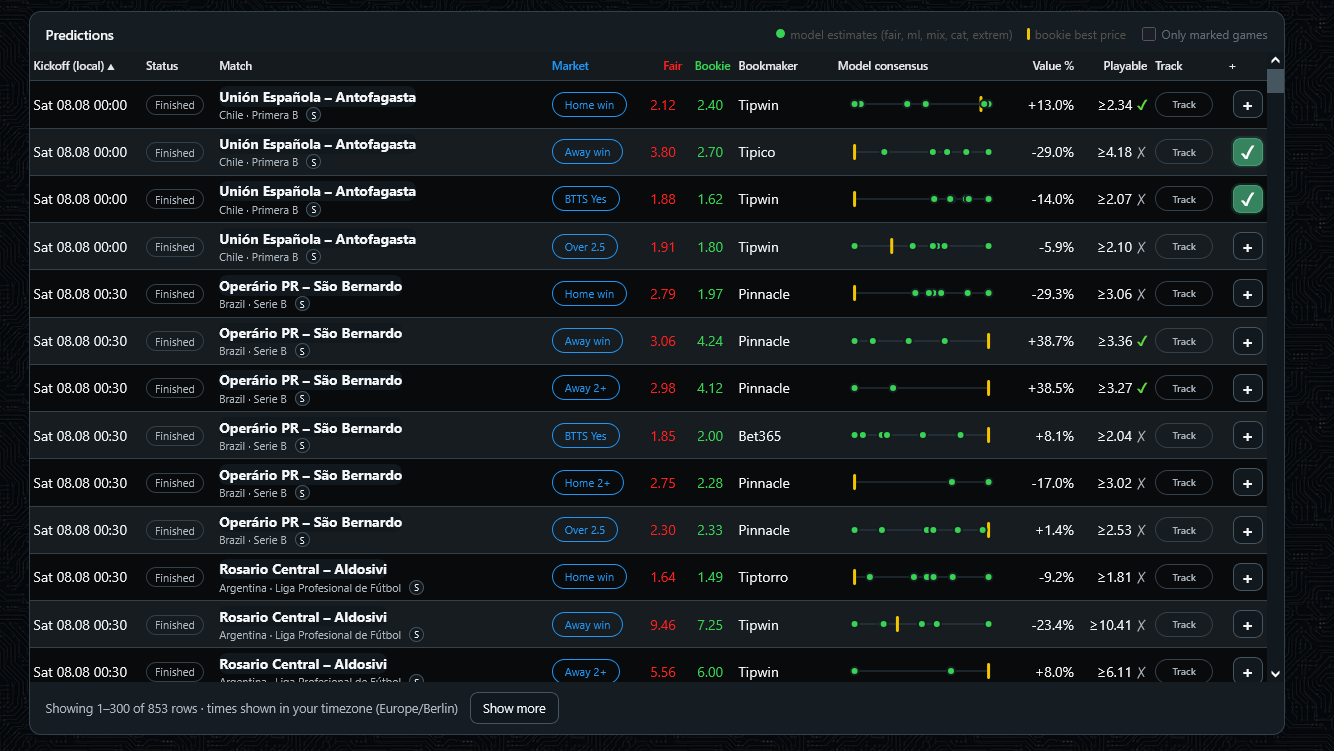
- Kickoff (local)
- Match kickoff time in your chosen display timezone (set under My Account). Click the column header to sort.
- Status
- "NS" (not started), a live status, or "Finished" once the match has a final result.
- Match
- Teams, competition and country. The small "S" badge opens Search Similar Games for that fixture.
- Market
- The specific bet type this row is about (Home win, Over 2.5, BTTS Yes, etc.).
- Fair
- The model's calculated fair odds for this market.
- Bookie
- The actual price at the selected bookmaker (or the best available price, depending on the Bookmaker filter).
- Model consensus
- Dots showing how several model variants independently estimate this outcome; the vertical bar marks the bookmaker's price on the same scale. Tightly clustered dots mean the models agree.
- Value %
- How much better the bookmaker's price is than fair — see the Guide page (public "How it works" page) for the full explanation.
- Playable
- Green ✓ if this row clears the minimum value threshold worth betting on, red ✗ otherwise.
- Track
- Adds this single selection straight to your Bet Tracker (see below), skipping the betslip.
- + (last column)
- Adds this selection to the betslip on the right, where you can combine it with others and set a stake.
- Clicking a row
- Expands an inline detail panel with every market's fair odds and every bookmaker's price for that fixture side by side — see below.
Row detail view
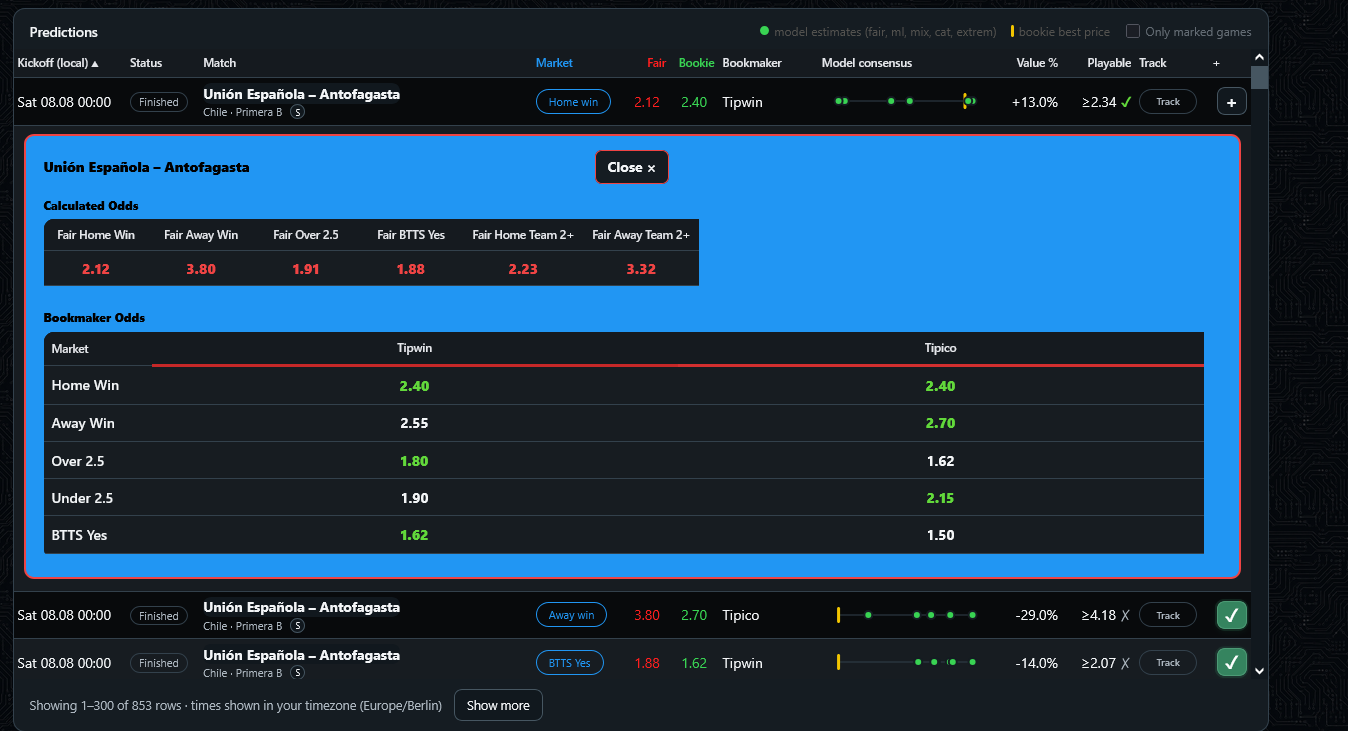
Click anywhere on a row to expand it. "Calculated Odds" lists the model's fair price for every market on that fixture at once; "Bookmaker Odds" lists every tracked bookmaker's price per market, so you can compare without leaving the table. Click "Close" to collapse it again.
Marking games
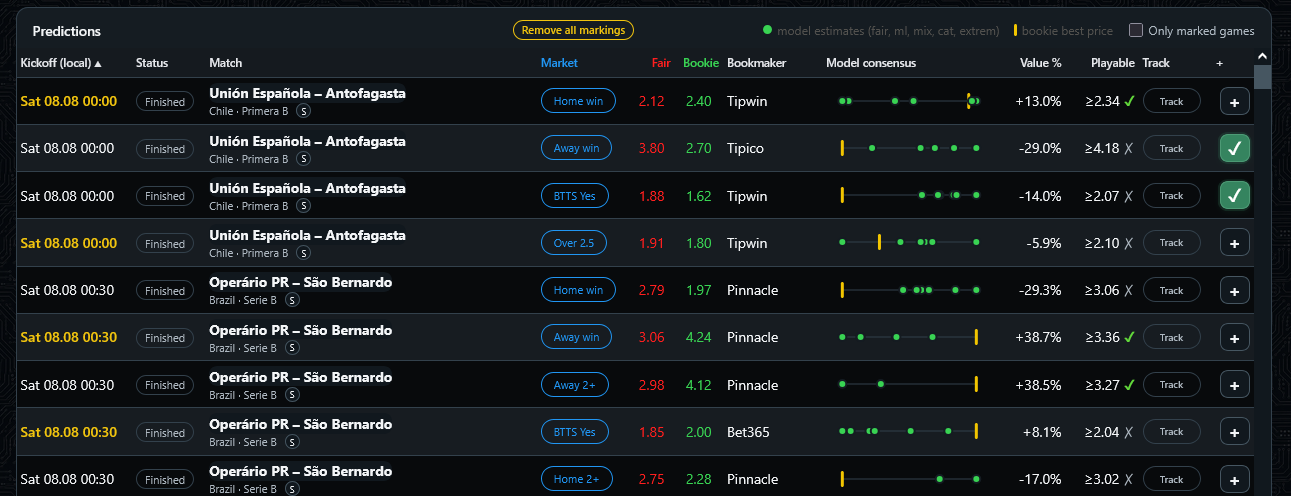
Click the kickoff date/time of any row to mark that fixture — it highlights in gold, purely as a personal visual reminder (nothing is saved to your account, it resets on reload). Once at least one row is marked, a "Remove all markings" button appears at the top to clear them all at once.
Showing only marked games
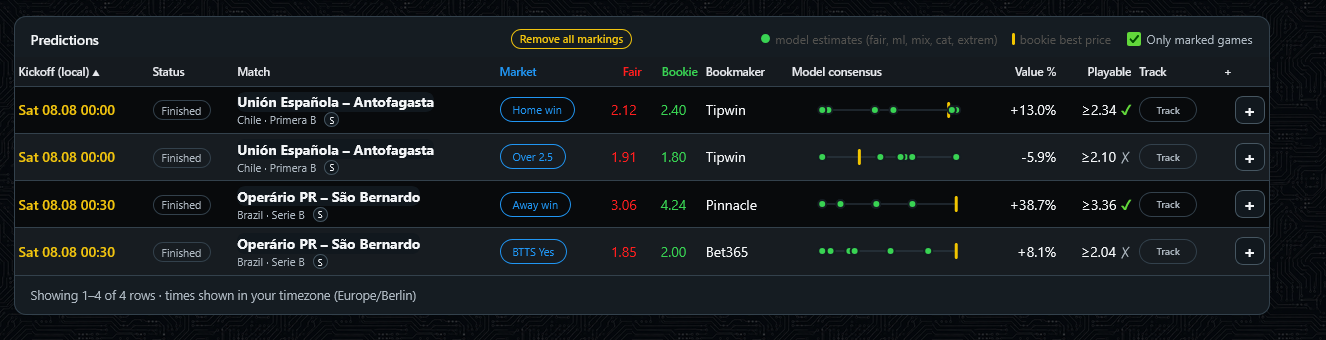
Tick "Only marked games" (top right of the table) to filter the view down to just the rows you've marked — handy for shortlisting picks while scrolling through a long list, then reviewing only your shortlist afterwards.
Search Similar Games
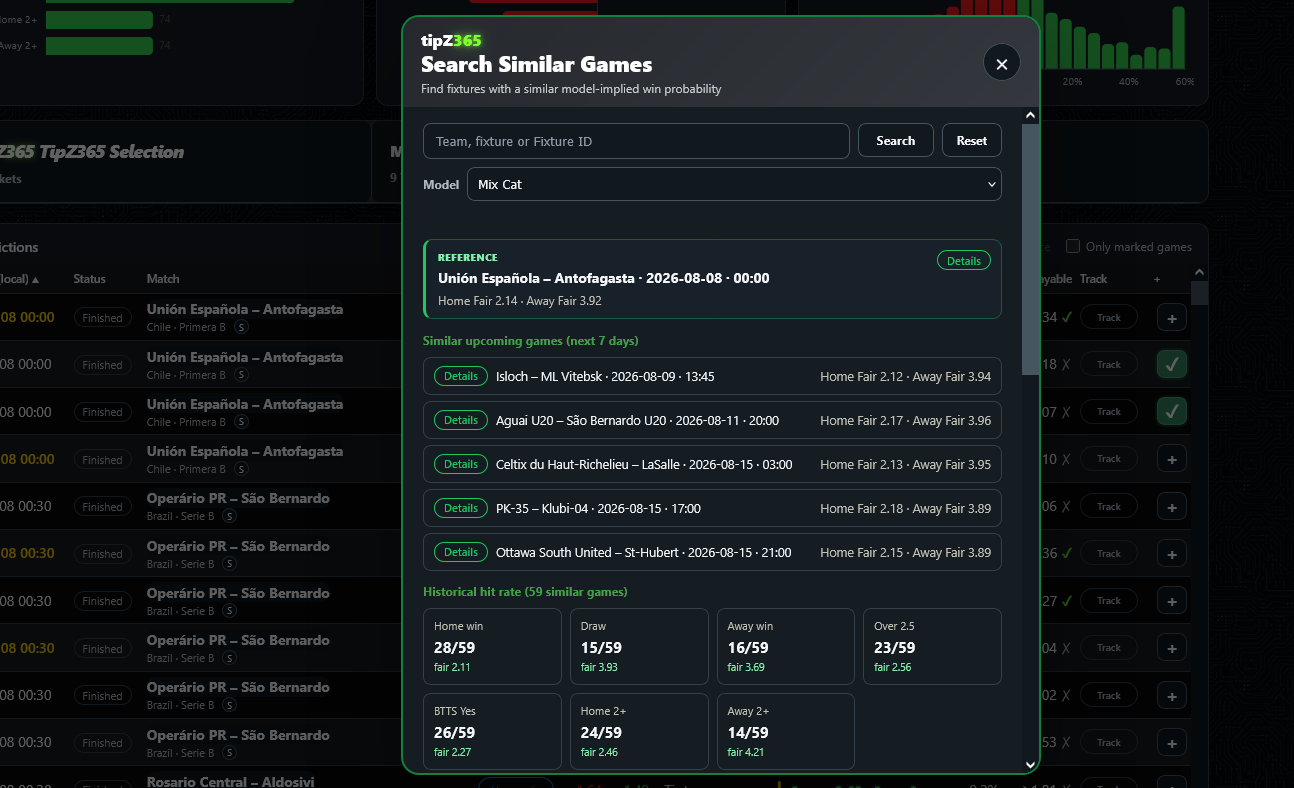
Opened via the small "S" badge next to any match in the Predictions table (or from the header menu, to search manually).
- Search box + Model
- Look up a specific team, fixture or Fixture ID manually, and pick which model's fair-odds estimate to base the comparison on.
- Reference (green box)
- The match you opened this from. Its Home/Away fair odds are the baseline every other match is compared against.
- Similar upcoming games
- Other fixtures in the next 7 days whose model-implied Home/Away fair odds are close to the reference match's — i.e. games the model rates as having a similarly-shaped outcome.
- Details
- Expands full market-by-market odds for that specific fixture, same as clicking a row in the main table.
- Historical hit rate
- Among all historically similar games found (sample size shown, e.g. "59 similar games"), how often each market actually won, plus the average fair odds for that market across that sample — a way to sanity-check the model's current estimate against real past outcomes for comparable matches.
Reference card: full market grid, and marking
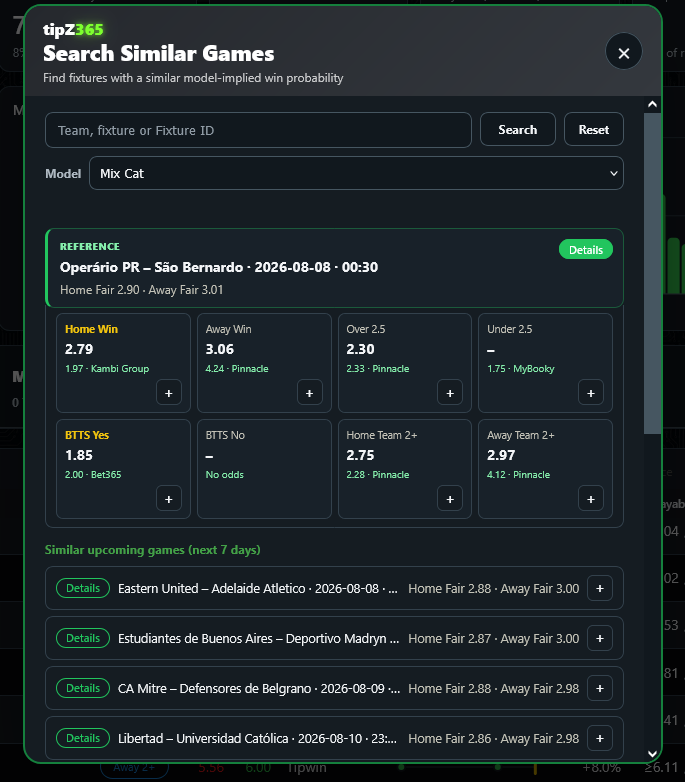
- Market grid under the reference
- Every market for the reference fixture at once (Home Win, Away Win, Over/Under 2.5, BTTS Yes/No, Home/Away 2+), each with its fair odds and the best available bookmaker price. "–" / "No odds" means that market isn't currently priced by any tracked bookmaker.
- + on a market
- Adds that specific market straight to your betslip, without leaving the Similar Games panel.
- Clicking a market label
- Marks it in gold — the same personal marking feature as in the main Predictions table, just scoped to this reference card.
- + on a similar upcoming game
- Each entry in the "Similar upcoming games" list also has a + to add it to the betslip directly, alongside its "Details" button.
Header menu (☰)
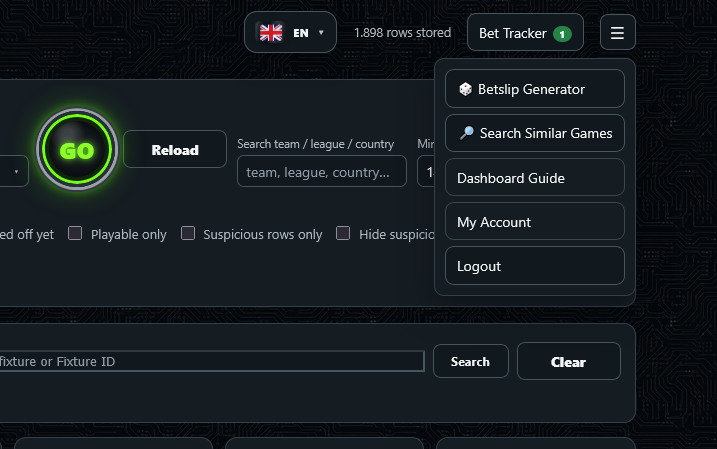
- Betslip Generator
- Randomly builds a combo bet from the current Predictions table filter — see below.
- Search Similar Games
- Opens the same Similar Games search described above, so you can look one up manually instead of via the "S" badge.
- Dashboard Guide
- This page.
- My Account
- Membership status, password change, and your display timezone preference.
- Logout
- Signs you out.
Betslip Generator
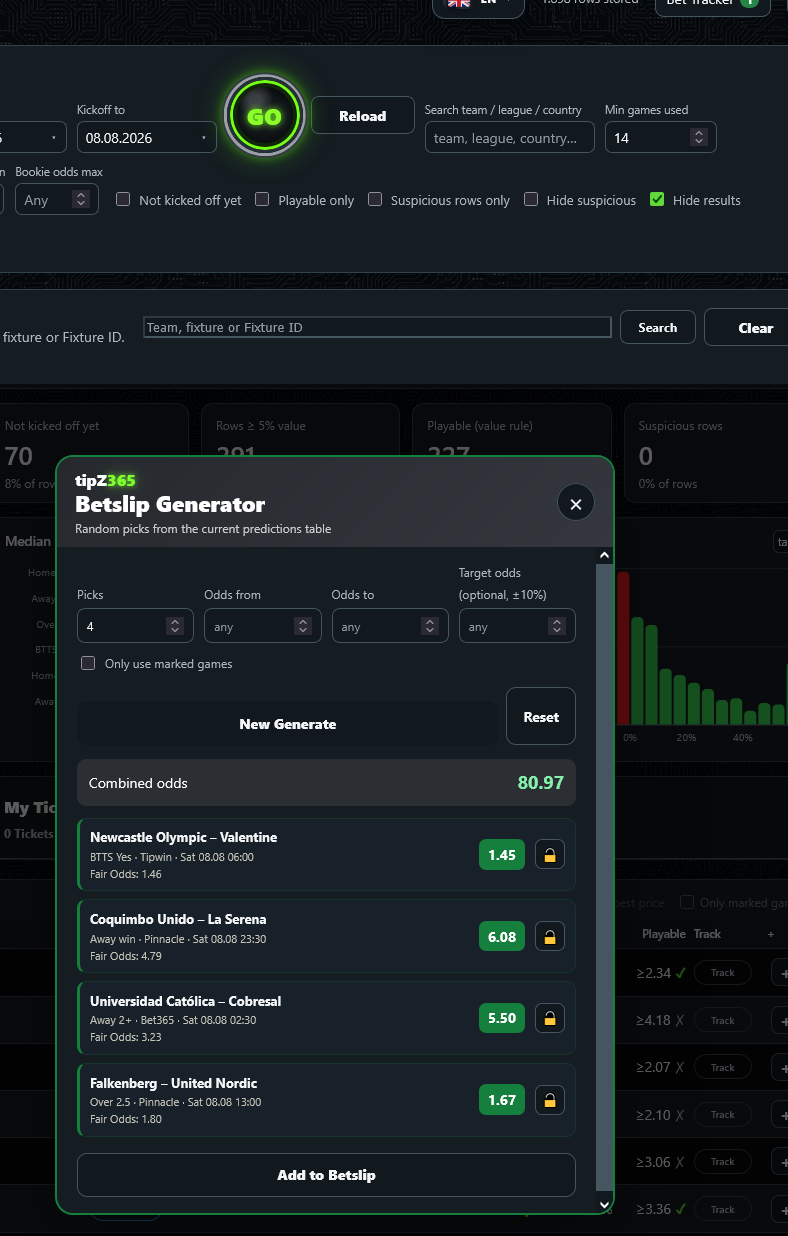
Randomly picks selections from whatever the Predictions table is currently showing — handy if you don't want to search yourself.
- Picks
- How many selections the generated combo should contain.
- Odds from / Odds to
- Restricts each individual pick's odds to this range.
- Target odds (optional, ±10%)
- Tries to build a combo whose combined odds land close to this value.
- Only use marked games
- Restricts picks to fixtures you've marked (see "Marking games" above).
- New Generate
- Rolls a fresh random combo under the current settings.
- Reset
- Clears the generator settings back to default.
- Lock icon on a pick
- Keeps that specific selection in place — "New Generate" will then only re-roll the unlocked picks.
- Add to Betslip
- Adds the entire generated combo to your betslip at once.